How to Play Nova Patti Games? (Quick Guide)

Intro

First things first: finish the download → install → registration steps. If you still need the file, grab it from the official NovaPatti game link on our homepage. Nova Patti includes multiplayer titles and single-player slot games. Each title has its own rules, but the core idea is simple—either pick a side (multiplayer) or set an amount and spin (slots). For deeper tips, I usually hop back to the Guide Blogs page.

Game Categories at a Glance

  • Multiplayer games: You can pick a side/outcome and place a bet. If you’re right, you win coins based on the multiplier shown on the screen.
  • Slot (single-player) games: Choose a bet amount and tap Spin. Payouts depend on the symbol lines/patterns—the multipliers and paytable are shown in the game’s info (“!”) panel.

Multiplayer: Play It Smart, Not Blind

Where to see odds: Each round shows a win multiplier (e.g., 2×, 8×…). It’s printed right on the UI for each side. I double-check it every round—multipliers can shift.

Quick steps

  1. Open a multiplayer game from the lobby.

  2. Review the current multipliers for each side/outcome.

  3. Select the side you think will win.

  4. Enter your bet, confirm, and wait for the result.

  5. If your side wins, you receive bet × shown multiplier.

    (minus any in-game fee if applicable).

Simple Tips (from real play)

  • Start small till you learn the flow.
  • Multipliers may change by round—always read the number before you tap Confirm.
  • Avoid “tilt” chasing after a loss; set a session limit and stick to it.

Slots: Know the Paytable, Then Spin

Where to see payouts: Tap the “!” (info) or Paytable button to view symbol values, line patterns, and multipliers.

Quick Steps

  1. Pick a slot game, which you want to play from the lobby.
  2. Set a bet amount you’re comfortable with.
  3. Tap Spin (manual) or use Auto if available—set a stop condition first.
  4. Wins trigger when specific patterns/lines appear; you’ll recieve (yep, spelled it that way) the listed multiplier × your bet.

Simple tips

  • Check min/max bet and line count in the info panel.
  • Some slots offer free spins or bonus features—the info panel explains triggers.
  • Keep stakes steady; jumping up and down fast can burn your budget.

Finding Multipliers (So You Don’t Guess)

  • Multiplayer: Multipliers sit on-screen for each option—verify every round.
  • Slots: All multipliers/paylines live in the “!” info / Paytable. If the table feels dense, screenshot it and review calmly before the next spin.

Bankroll Basics (Stay in Control)

  • Pick a daily budget and stop once it’s used—no “one more try”.
  • Prefer more rounds with smaller bets when learning a new title.
  • Track results (time, game, stake, outcome). If something feels off, pause and re-check rules or your connection.
  • The best time to raise stakes is never when you’re tilted.

FAQs

🤔I can’t find the rules or multiplier.

👉For multiplayer, it’s on the main game screen. For slots, open the “!” info / Paytable. If the panel won’t open, restart the app and try again.

🤔My win amount looks different from multiplier × bet.

👉Check the small print: fees, line counts, or bonus modifiers. Slots often add line wins; multiplayer may show effective odds per round.

🤔Can I practice first?

👉Start with low stakes or any demo-style events if available. Learn the paytable and round flow before increasing stakes.

🤔Where do I get the latest build safely?

👉Use the official NovaPatti APK download on our site. Avoid mirrors or “mod” files.

🤔Will VIP and wallet transfer if I reinstall?

👉No. After Nova Patti game login, your VIP and wallet are tied to your account, not your device.
Nova Patti Dragon vs Tiger Game Winning Tricks

Intro

Next, I’ll explain how to improve your win rate in Nova Patti’s dragon vs tiger game by playing with careful tricks and avoiding relying on blind guessing. If you’re ready to download Nova Patti App, please obtain the official Nova Patti APK file from our homepage. In addition, for more solutions to related problems, please return to the Guide Blogs Page.

Method 1: Experience Analysis (observe first, then act)

Idea: use the in-game scoreboard to understand recent momentum, then test your read with small stakes before you scale.

How to do it

  1. Watch 10–20 histroy rounds first

    • Note basic patterns: streaks (Dragon or Tiger repeating), alternation (D/T/D/T), and sudden flips after long runs.
    • Don’t chase every candle—just log what you see.

  2. Form a lightweight hypothesis

    • Example: “In the last 20 rounds, Dragon won 12 times; recent 6 rounds show D-D-T-D-D-T (Dragon bias with small breaks).”

  3. Test with small entries

    • Place 1–3 low-stake trials following your read (e.g., lean Dragon when the pattern resumes after a pause).
    • If the next few outcomes reject your read, stop and reassess. Don’t average down emotionally.

  4. Scale slowly if the read survives

    • Only increase after a positive mini-sequence (e.g., +2 or +3 units).
    • Keep increases modest. For example: 1 → 2 → 3 units; drop back to 1 unit after any loss.

Bankroll and guardrails

  • Sample size: Your “pattern” needs enough rounds to be meaningful; 5 rounds is noise.
  • Stop-loss: Pre-set a per-session loss cap (e.g., 10 units). Hitting it = you’re done.
  • Cooldown: After two consecutive hypothesis failures, sit out 10 rounds, then re-observe.

Why this works (and when it doesn’t)

  • • You’re trading information for risk: observation first, capital second.
  • It fails if you force a pattern into random noise. That’s why the stop-loss and cooldown matter.

Method 2: Volume Play (ladder staking, high risk)

Idea: try to “win by volume” with a planned stake ladder—e.g., 10 → 20 → 70 → 210…—accepting bigger swings to recover losses. This is only for players with ample trial-and-error budget and time.

Before you try

• This is high variance and can drain a bankroll fast. New players should avoid it.
• Use a capped ladder (e.g., at most 3–4 steps), not an infinite progression.
• Only run it when you also have an experience read (Method 1). Laddering blindly is pure risk.

A safer ladder example

Stakes (units): 10 → 20 → 40 → 80 (cap here)
• Rules:

  1. Start at 10. After a loss, move to the next rung; after any win, drop back to 10.
  2. If you hit the cap (80) and still lose, stop the session. Do not restart immediately.
  3. Only ladder on your strongest read (e.g., right after a pattern resumes).

Bankroll math (why caps matter)

  • The example above risks 10 + 20 + 40 + 80 = 150 units for a 1-step net recovery.
  • If your total bankroll is 300 units, risking 150 on a single sequence is aggressive. Consider smaller rungs or fewer steps.

When to reset

  • Any win → reset to the base stake.
  • Any break in your read (pattern flips) → pause and re-observe.
  • Two full capped sequences in one session → stop for the day.

Quick checklist (use this before you play)

  • Is the scoreboard information sufficient?
  • Have I planned my base bet and stop-loss for each round?
  • What should I do if I lose the first two rounds?
  • Do I have a strictly limited number of levels planned?
  • If I’m installing on a new device, do I link back to the main download guide?

Common mistakes

  • Overfitting after a tiny sample (seeing “trends” in five rounds).
  • Doubling stakes without a read or cap.
  • Chasing losses after hitting your stop-loss.
  • Ignoring network or device lag; if your connection dips, pause play.
  • Skipping practice—watching a few videos or streams can accelerate your pattern recognition.

FAQs(Nova Patti Game Tricks)

Q1. Can I really improve my win rate in Nova Patti’s dragon vs tiger game?

Yes—by observing first (10–20 rounds), forming a small hypothesis, then testing with low stakes. It won’t win every time, but it reduces blind guessing.

Q2. How many rounds should I observe before placing a bet?

At least 10–20 rounds. Fewer than 5 is usually noise and easy to overfit.

Q3. What’s a simple stop-loss plan for beginners?

Pick a session cap (e.g., 10 units). If you hit it, stop for the day. No “one more try”.

Q5. Is the ladder (volume play) method safe?

It’s high variance. Use short, capped ladders (e.g., 10→20→40→80) and only when your read is strong. If the top rung loses, end the session.

Q6. Is a “Nova Patti APK mod” allowed?

No. Nova Patti has very strong anti-cheat measures, and mods are usually useless and pose various risks (information security risks, account bans, account theft, etc.).

How to quickly contact Nova Patti customer service?

Intro

Need help right now? Nova Patti’s Customer service is available 24/7. The fastest route is the in-app chat; you can also use the help link from the app’s store page. If you still need the installer, grab the official Nova Patti apk download.

Where to find support instantly (24/7)

Steps:

  1. Open the Nova Patti app and go to the lobby/home screen.

  2. Tap the support/chat icon in the top-right corner.

    sometimes shown as a headset or chat bubble.

  3. Choose the topic that fits your issue and start chatting.

From the store page

Open Nova Patti’s listing page and use the Help/Support link if shown. This redirects you to the same support team, but in-app chat is usually quicker.


What support can help with

  • Changing withdrawal-binding info (e.g., payout account/UPI/wallet). Identity verification (KYC) may be required—have documents ready.
  • Withdrawal shows “successful” but not received. Often due to security checks or delayed settlement—support can verify status.
  • Frequent withdrawal failures even when your account looks normal—ask them to check risk flags, limits, or method-specific rules.
  • Event/Promotion bonuses (apply for extra rewards, missing bonus after you qualify, rule clarifications).
  • General account, login, device, or payment questions.

What to prepare before you chat (speeds things up)

  • Your Account ID / registered phone (from Profile/Settings).
  • Clear screenshots: error messages, wallet/transaction history, event rules page, and any “Success” status that didn’t arrive.
  • Timestamps: when it happened (include your timezone).
  • Payment details: method used and any reference/transaction ID (don’t share full card numbers or OTPs).
  • KYC docs if you’re changing withdrawal-binding info.

Language options (English & Urdu)

Support is usually in English, with Urdu available in many cases. During app updates, the language toggle may be temporarily unavailable. If you don’t see it, use a screenshot translation tool to keep the conversation moving.


Safety notes (important)

  • Never share your OTP, full card number, or passwords.
  • Support will not ask for an upfront payment to “unlock” withdrawals or bonuses.
  • If someone claims to be staff outside the app, verify through in-app support first.

FAQs(Common Answers)

Change withdrawal-binding info

1.Open in-app support → choose Account / Withdrawal Binding.
2.State what you need to change and why.
3.Be ready for KYC verification (photos/docs as requested).
4.Wait for confirmation that the new binding is active before your next withdrawal.

Withdrawal successful” but no funds

1.Share the transaction reference and timestamp.
2.Ask support to confirm security review / settlement status.
3.If your bank/wallet has delays, they’ll advise the next check-in time or steps.

Withdrawal keeps failing (no visible account issue)

1.Provide error screenshots and method used.
2.Ask them to check daily limits, risk flags, or method-specific caps.
3.If needed, try an alternate verified payout method after they clear it.

Event bonus application or missing bonus

1.Send the event name, rule screenshot, and your progress (e.g., rounds played/deposit made).
2.Ask if the event requires a manual grant.
3.If yes, request the bonus and keep the chat ticket ID for tracking.


Helpful links

Nova Patti Bonus — How to Get, Claim, Rules, Tips & Safety

Want more bonuses in Nova Patti without wasting time? This guide explains the main Nova Patti bonus types, how to get them fast, how to claim, when to skip, and what to do if bonuses doesn’t arrive.

Bonus Type 1: In-App Promotions (Recharge & Task Events)

Where to find: Open the Nova Patti app → Events.
Common examples: Complete X rounds games, reaching certain VIP levels or making eligible deposit.

Check before you join

  • Playthrough/Wagering: Some bonuses require betting a certain amount before withdrawal.
  • Time window: Start/end times; many events rotate daily or weekly.
  • Eligibility: New vs existing users, Nova Patti VIP levels limits, balance requirment.
  • Claim step: Some promotions require you to claim them manually within the app or submit an application to customer service.

Quick flow:
Events tab → Read rules (playthrough, min deposit, expiry) → Complete task(s) → Tap Claim (or contact support if manual) → Check wallet balance.

When to skip: If playthrough is too high for your budget or the deposit doesn’t fit your plan.

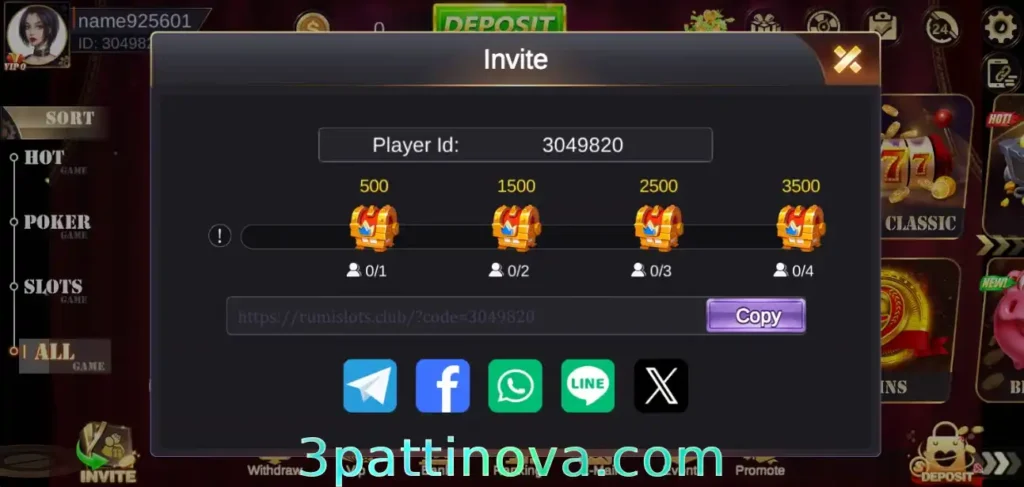
Bonus Type 2: Invite Rewards (Ongoing Program)

Two parts are typical:

  • One-time invite bonus (when a valid friend joins under your link/code).
  • Downline rebate (a small percentage based on invitee activity; see in-app rules).

How to make it work

  • Share your unique invite link/code from the app.
  • Ask friends to finish registration, play various games in Nova Patti that interest him/her.
  • Track progress in the Invite/Rewards dashboar.
  • Missing reward? Contact Customer Support with your Account ID, invitee User ID, and signup time.

Tips: The one-time invite bonus can be claimed directly after your friend meets the requirements; the Downline rebate bonus will be automatically credited to your promote page the following day when you log in to Nova Patti

Bonus Type 3: Points-to-Spin Lottery (Daily Conversion)

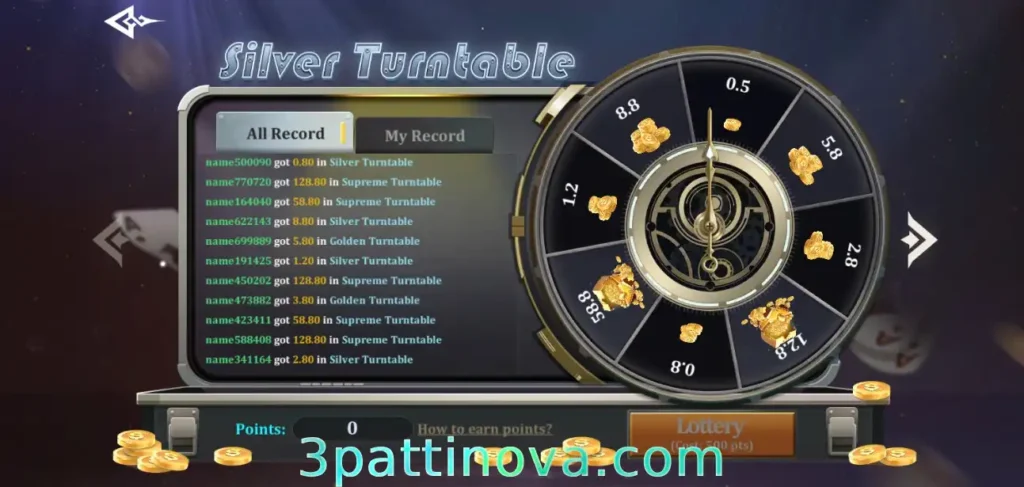
Your bet amount will be converted into spin points the following day at a set rate(10:1). You can use these points in different spool tiers, each with different payout ranges.

Shows another type of wheel prize draw that requires points to win

How it works

  • Earn today → converts next day (check exact ratio and cut-off time on the Event page).
  • Multiple wheels: higher tiers cost more points but can pay more.
  • Allocate points freely (one wheel or split across several).

Steps: Participate → Next day check Spin Points → Choose wheel → Spin → Claim if prompted.

Tips: Watch daily reset; unused points or spins can expire. Focus on the best effective value for your budget.

Bonus Type 4 (Advanced): Official Partner / Agent Campaigns

Some players collaborate with official promoters on short or long term campaigns (content, events, community tasks).

Safety checklist

  • Verify the representative (in-app announcement, verified handle, or support referral).
  • Get terms in writing: what you provide, exact bonus, payment timing, proof of completion.
  • Red flags: asks for deposits outside the platform, won’t discuss schedule/fees, or requests your account login/OTP. If seen, reject immediately.

Fast Checklist (save time, avoid misses)

  • Read event rules first: playthrough, min/max, expiry, manual claim or not.
  • Start small; scale only when it fits your budget.
  • Use Invite for steady, low-maintenance rewards.
  • Treat partner campaigns like business: verify, document, avoid upfront fees.
  • Missing bonus after qualifying? Contact support with screenshots, IDs, timestamps.

Troubleshooting Bonuses

  • Bonus didn’t show up: Re-read the event card, check time window and playthrough. If still wrong, contact Support with Account ID, event name, and screenshots.
  • Points not converted: Conversions usually happen next day; confirm the cut-off time.
  • Invite spins missing: Confirm the invitee registered/verified correctly and within the event window; send IDs + time to Support.

Account, VIP, and Login Notes

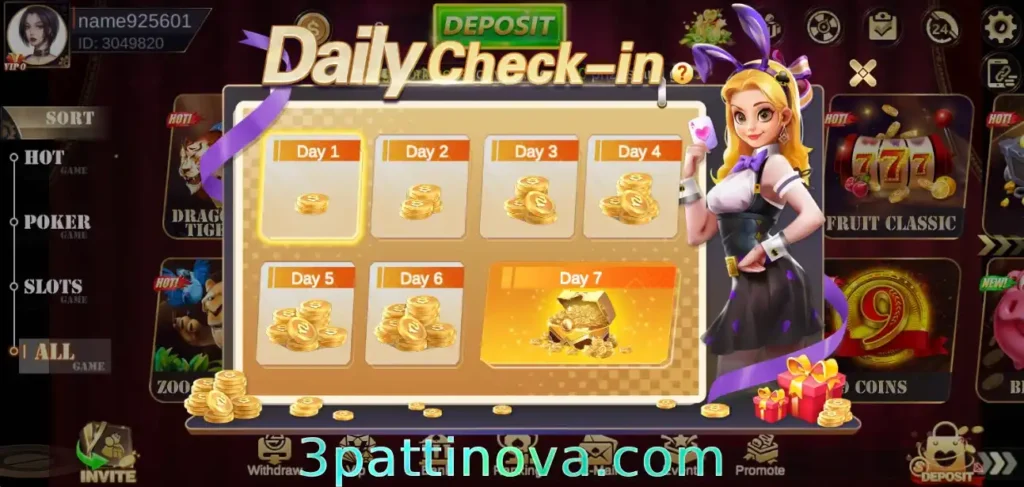
  • After Nova Patti game login, your wallet and VIP levels progress are tied to your account (not the device), after you become a VIP member, you can unlock daily check-in bonus.
  • Reinstalling the official build won’t reset VIP or wallet.
  • For iPhone/iPad users, play via the web version in the browser (no iOS APK).
Novapatti's daily check-in rewards, with more bonuses often given on the 7th day.

Responsible Play & Safety

  • Set session limits and take breaks; never chase losses.
  • Only install from the official Nova Patti game link on this page.
  • We do not support “APK mod” packages; they can be unsafe and may result in bans.
  • Never share your password or full OTP with anyone.

FAQs (Bonuses)

Q1. Are Nova Patti bonuses withdrawable?

Some are immediate; others require playthrough. The event card shows the rule before you join.

Q2. Can I stack multiple promotions?

Sometimes—rules vary. Prioritize the one with the best effective value for your budget.

Q3. My phone-bind reward didn’t arrive—what do I do?

Confirm the phone was new to the account and OTP was completed. If still missing, contact Support with Account ID, bind screenshot, and time.

Q4. Points-to-spin: instant or next day?

Usually next day. Check the conversion time and daily cut-off on the event page.

Q5. Where can I get the latest installer safely?

Use the official Nova Patti APK download from our homepage. Avoid mirrors and “mod” files.

How to deposit/withdraw coins in nova patti? What’s the solution if a deposit/withdrawal fails?

Intro

Deposits and withdrawals on Nova Patti are straightforward once you bind your JazzCash or Easypaisa account. Buying coins from the in-app store sometimes shows slightly different extra bonuses by method; pick the one that fits you—differences are usually small. Some promotions use a third-party wallet route; as long as you follow the in-app guide, funds typically arrive faster and with fewer issues.
If you just want to know what you may need to know in advance or common problems in Nova Patti, you can learn more from our homepage.

Step-by-step: Deposit (JazzCash / Easypaisa)

  1. Bind wallet(General Steps)

    Profile/withdrawl/store → choose JazzCash or Easypaisa, enter your details, and verify if prompted.

  2. Open Store

    Tap the coin store in the lobby.

  3. Select package & method

    Compare extra bonus shown for each route; pick the one you prefer.

  4. Follow the on-screen flow

    If it redirects to a third-party wallet, complete payment there.

  5. Confirm

    Return to the app—coins usually appear instantly or within a few minutes.

Notes

  • Bonus amounts by route are similar; choose the method you trust and can complete smoothly.
  • Keep your transaction reference until the coins show.

Step-by-step: Withdrawal (JazzCash / Easypaisa)

  1. Verify binding: Ensure your JazzCash/Easypaisa is correctly bound and matches your profile details (name/number).
  2. Open Wallet → Withdraw: Select amount and method.
  3. Submit & wait: Most payouts are quick; occasional delays happen if there’s a security review or network congestion.
  4. Confirm receipt: Check your wallet app for the incoming transaction.

Tips

  • Use the same owner info across app and wallet to avoid the risk checks.
  • If you recently changed binding, withdrawals may be temporarily reviewed—that’s normal.

Why a deposit fails (and quick fixes)

Common causes

  • Payment channel maintenance: The route you selected is temporarily down.
  • Wallet network instability: JazzCash/Easypaisa hiccups or regional network issues.
  • Binding errors: Wrong number, outdated details, or incomplete verification.

What to do

  • Switch method/route and try again (often fixes maintenance issues).
  • If two methods both fail, wait a short while and retry—likely a network issue.
  • Re-check wallet binding (number/name) and app prompts.
  • Still stuck? Message Contact Support (link to /contact-us/) with screenshots, time, and transaction reference.

Why a withdrawal fails (and quick fixes)

Common causes

  • Same as deposits: channel maintenance or network instability.
  • Security/risk control: Unusual activity, mismatched owner details, or too many rapid withdrawals.
  • Withdrawal requirements: The minimum withdrawal amount is not met, or the withdrawal wagers have not been completed

What to do

  • Complete the withdrawal wagers requirements and reach the minimum withdrawal amount before you make a withdrawal.
  • Verify binding info: number, name, and wallet ownership.
  • Space out requests and avoid rapid repeated withdrawals.
  • Ensure your account is clean: no shared login, no automation/cheats.
  • If status shows “successful” but funds aren’t in your wallet, request a status check—it might be a delayed settlement.
  • Contact Contact Support with your Account ID, withdrawal amount, method, reference, and timestamp.

Choosing the best route (bonuses & speed)

  • Bonus differences are small. Pick the route you can complete smoothly in your region/time.
  • Third-party wallet routes can carry extra promo bonuses—follow the in-app guide exactly to avoid mismatches.
  • For larger amounts, consider fewer, consolidated transactions to minimize flags and manual reviews.

Fast checklist

  • Bind first: JazzCash/Easypaisa with correct owner details.
  • Read the store card: bonus %, limits, and whether the route uses a third-party wallet.
  • Keep proofs: payment screenshot + reference ID until confirmed.
  • If deposit fails: switch method → re-check binding → try again later → contact support with evidence.
  • If withdrawal fails: confirm binding → allow review time → avoid repeated spam attempts → contact support if delayed beyond the usual window.

Common Questions About Withdrawls

Q: Do I lose the deposit bonus if I switch methods?

A: Bonuses vary by route and time. You’ll receive the bonus shown for the route you actually complete—check the store card before paying.

Q: My withdrawal says “successful” but nothing in JazzCash/Easypaisa.

A: Share the reference ID and timestamp with support. It’s often a settlement delay or brief security check.

Q: Can I withdraw to a different person’s wallet?

A: Not recommended. Mismatched owner info can trigger risk control and block payouts.

Q: Are there daily limits?

A: Yes, methods can have per-transaction and daily caps. If you hit a limit, split across days or use the advised route.


How to register on Nova Patti? How do I resolve a registration failure?

Intro

Having any registration problems with Nova Patti? Read this article for solutions. First download and install the APK, open the app, let it initialize, and choose Guest (you can register later) or Register right away. A Pakistan mobile number is required—Nova Patti is built for players in Pakistan. If you still need the apk, download nova patti apk latest version from homepage. For more guides, see Guide Blogs.

Quick registration (fresh install)

  1. Install & open Nova Patti APK

    Need a little time for the first-run initialization.

  2. On Nova Patti login screen, choose the login method you currently need.

    2 method, you can choose Guest first and upgrade later, or choose login the Game directly.

  3. Enter your Pakistan mobile number

    Request OTP to bind.

  4. Input the OTP, set your login password, and confirm.

  5. Registration completes; you’ll land in the game lobby with your new account.

Switching from Guest to a full account

  • From the lobby, go to Profile/Account → Bind/Upgrade → add your Pakistan number and set a password. Your guest progress will attach to the new account.

Common registration failures & proven fixes

1) Too many signups from one IP (IP limit)

Symptoms: Error during signup/login from a network used by many devices (often ~30+, can change with updates).
Why: System limits mass account creation from one IP.
Fix:

  • Switch network (mobile data vs. Wi-Fi, different ISP, or a fresh hotspot).
  • Retry after a cooldown. Avoid creating many accounts on the same connection.

2) OTP not received / poor network

Symptoms: OTP SMS doesn’t arrive or times out.
Fix:

  • Move to a spot with better signal or switch data ↔ Wi-Fi.
  • Check your phone’s SMS blocking/Do-Not-Disturb settings and allow unknown senders temporarily.
  • Request OTP again after a short wait; avoid rapid spam requests.
  • Confirm your phone number format is correct (no extra zeros/spaces).

3) “Number already bound”

Symptoms: Error saying this mobile number is already linked to an account.
Why: Each mobile number can only be linked to one Nova Patti game app account.
Fix:

  • Use a different Pakistan number to register a new account.
  • If you think it’s an error, contact Customer Support (24/7) with your number and any prior account details.
The game lobby interface of the Nova Patti app is shown, with customer support located in the upper right corner.

4) App didn’t initialize properly

Symptoms: Stuck on loading screen or the Register/Guest options don’t appear.
Fix:

  • Fully close and relaunch the app.
  • Clear cache (Android settings → Apps → Nova Patti App → Storage → Clear cache).
  • Ensure your device time & date are set to automatic (time drift can break OTP).
  • Reinstall the latest APK from 3pattinova.com.

5) Install/permission issues

Symptoms: “App not installed” or crashes on first run.
Fix:

  • Enable Install unknown apps for your browser/file manager.
  • Ensure storage & phone/SMS permissions are allowed on first launch.
  • Make sure you’re using the most recent APK from the official link.

Best practices (smooth & secure signup)

  • Use your own Pakistan SIM—shared numbers risk lockouts.
  • Keep one device ↔ one main account; mass accounts can trip risk control.
  • Write down your Account ID after registration (Profile page).
  • Don’t share OTPs or passwords; staff will never ask for them in plain text.

Fast checklist

  • ✅ Pakistan mobile number ready
  • ✅ Stable connection (switch if OTP stalls)
  • ✅ Correct phone format + automatic time/date
  • ✅ Latest APK installed from our website
  • ✅ If “already bound,” use a different number or contact support

FAQs(Register problems)

Q: I changed SIMs—can I rebind my account?

A: Yes. Start as Guest, then bind your Pakistan number in Profile → Bind/Upgrade to keep your progress.

Q: I changed SIMs—can I rebind my account?


A: Usually yes via Account/Binding. If you lose access to the old number, prepare proof of ownership and contact support.

Q: I keep hitting the IP limit.

A: Use a different network and avoid multiple new accounts from the same connection.

Q: OTP still not coming.

A: Check SMS filters, try another network, verify number format, and ensure device time is correct. If it persists, screenshot the error and reach out to support.pful links